
Table of Contents
ToggleIn India’s rapidly evolving digital ecosystem, managing your EPF account no longer needs to be a complicated or time-consuming task. The government’s push toward mobile-first services has empowered millions of employees with easy access to PF-related tasks directly from their smartphones. One of the most impactful developments in this shift is the ability to complete the UAN generation process—along with activation and authentication—entirely through the UMANG App.
For years, employees were dependent on employers, paperwork, or offline verification to obtain and activate their UAN. Today, everything is simplified into a fully digital flow: your Aadhaar, your face authentication, and your mobile number are all you need. Whether you’re entering the workforce for the first time, switching jobs and activating an existing UAN, or simply verifying your identity to access EPFO services, UMANG brings all these workflows under a single, intuitive interface.
This guide breaks down the entire journey—what you need, where to go, how the UAN generation process works, and how to solve common issues. Think of it as the easiest, most practical walkthrough you’ll find on the internet.
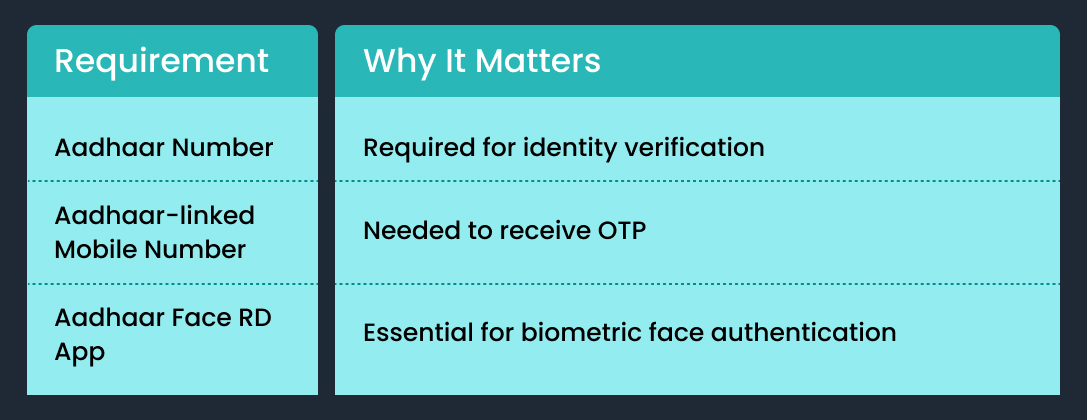
Before You Start: What You’ll Need
Make sure these essentials are ready before you begin the UAN generation process or activation steps:
Understanding the UAN Generation Process Through UMANG
If you’re a new employee or someone who has never had a UAN, the UAN generation process on UMANG helps you get your UAN instantly — without visiting any EPFO office or relying on your employer.
How the UAN generation process works
- Open the UMANG App
- Select EPFO → UAN Services
- Tap UAN Allotment & Activation
- Enter:
- Aadhaar number
- Mobile number
- Consent checkbox
5. Tap Send OTP and verify
6. UMANG checks if a UAN already exists for you
7. If none exists, proceed to Face Authentication
8. Once verified, the system completes the UAN generation process and your UAN is created instantly
9. You receive your UAN via SMS
Common issues during the UAN generation process
| Issue | Reason | Solution |
| Aadhaar/Mobile mismatch | Mobile not linked with Aadhaar | Update at Aadhaar centre |
| No OTP | Network issues | Retry / disable DnD |
| Face authentication fails | Lighting or camera error | Re-scan in proper light |
| UAN already exists | You worked earlier | Use the activation flow |
How to Activate an Existing UAN
If your employer already created your UAN, you just need to activate it before you can log in to EPFO services.
Steps
1. Open UMANG → EPFO → UAN Activation
2. Enter:
- UAN
- Aadhaar number
- Mobile number
3. Verify OTP
4. Complete Face Authentication
5. Your UAN is activated and you receive:
- UAN
- Temporary password
- Confirmation SMS
How to Authenticate Your UAN Using Face Verification
This step is essential for updating EPFO details, completing KYC, or verifying identity.
Steps
1. Open UMANG → EPFO → UAN Face Authentication
2. Provide consent
3. Complete face scan using Aadhaar Face RD App
4. UMANG retrieves:
- UAN
- Aadhaar
- Registered mobile
5. Details in EPFO are updated automatically
When to Use Which Option
| If You Want To… | Use This |
| Generate a new UAN | UAN Generation Process via UMANG |
| Activate an existing UAN | UAN Activation |
| Verify identity for EPFO | Face Authentication |
| Update EPFO details | Face Authentication |
Why UMANG Makes the UAN Generation Process Easier
- No paperwork
- No EPFO office visits
- Instant UAN creation
- Seamless identity verification
- Easy updates and KYC
All you need is Aadhaar, your mobile number, and a quick face scan.
Conclusion
The shift to digital self-service platforms like UMANG has completely transformed how employees interact with EPFO. What once required multiple office visits, paperwork, and long waiting periods can now be done in a matter of minutes—from the comfort of your home. Whether it’s the UAN generation process, activation, or face-based authentication, each step has been redesigned to reduce friction and eliminate dependency on intermediaries.
This simplicity is especially helpful for new employees who often struggle with understanding how PF works, or for individuals who have worked across multiple organizations and aren’t sure which UAN belongs to them. By enabling Aadhaar-based authentication, UMANG ensures that every user receives a unique, accurate, and verifiable UAN tied to their identity. This not only streamlines EPFO services but also improves data security and transparency for the employee.
Moreover, the face authentication feature brings an added layer of trust and convenience—allowing users to validate their identity securely without OTP delays, manual verification, or offline KYC. As India moves toward more digital public infrastructure, UMANG will continue to be a central tool for employees to manage PF services effortlessly.
In short, if you want a smooth, accurate, and reliable way to create or manage your UAN, the UMANG app is your best companion for the journey ahead.






Leave a Reply